Accessing Onboarded SmartZone Controllers in RUCKUS One
Administrators can view existing SmartZone (SZ) cluster details directly within the RUCKUS One interface once onboarding is complete.
-
From the navigation bar, select
. The SmartZones page displays a list of all
onboarded SmartZone clusters associated with the tenant account.
Onboarded SmartZone Controllers 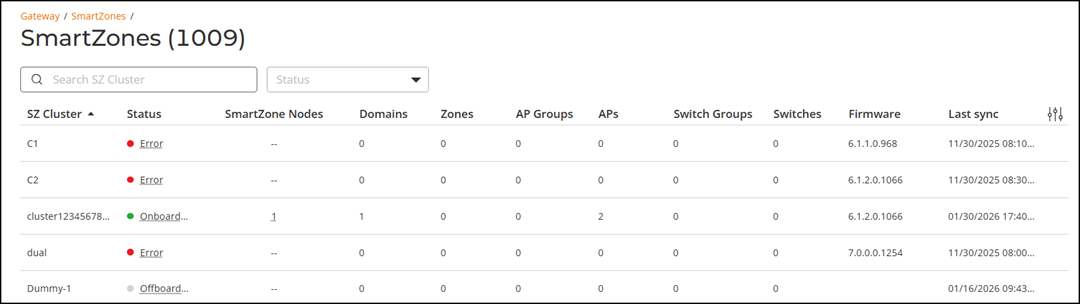
-
Review the SmartZone cluster
details displayed in the table.
You can use the Search option to filter clusters by name (minimum two characters required). You can also use the Status filter to display clusters based on operational or connectivity state. Click Clear Filters to reset all applied filters.
You can sort the list by clicking the associated column header.
You can customize which fields appear in the SmartZones table by clicking the
 icon and selecting or deselecting the desired column names. Optionally,
you can click Reset to
default to restore the standard column layout.
icon and selecting or deselecting the desired column names. Optionally,
you can click Reset to
default to restore the standard column layout.The SmartZones table displays the following details by default:
- SZ Cluster: Name of the SmartZone cluster.
- Status: Displays
the current connectivity or operational state.
If Error is displayed, pause your cursor over Error to view additional status information and specific errors encountered by the cluster.
- SmartZone Nodes: Displays the number of controller nodes in the cluster. Pause your cursor over the value to view individual management IP addresses.
- Domains: Displays the number of configured domains.
- Zones: Displays the number of zones managed by the cluster.
- AP Groups: Displays the number of configured AP groups.
- APs: Displays the total number of managed APs.
- Switch Groups: Displays the number of configured switch groups.
- Switches: Displays the total number of managed switches.
- Firmware: Displays the SmartZone firmware version number.
- Last Sync: Displays the timestamp of the most recent data synchronization from SmartZone.