Viewing the Application Insights
The Application Insights page provides historical insights into application usage across the network, including application traffic, client activity, AP distribution, and application usage trends over the selected time range.
- Wi-Fi
To view the Applications Insights page from Wi-Fi main page, on the navigation bar, select .
To view the Application Insights from Business Insights main page, refer to Applications Report.
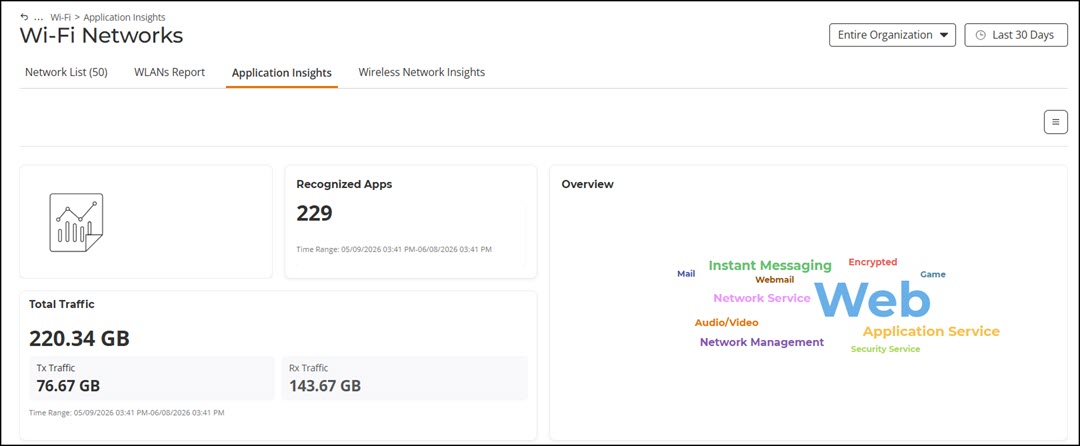
- Overview tile
- Top Applications by Traffic tile
- Top Applications by Traffic Over Time tile
- Top Applications by Client Count tile
- Top Applications by Client Count Overt Time tile
- Top Apps by Traffic vs. Client Count with AP Count tile
The data displayed is for the selected time period in the Date and Time filter.
Some of the tiles have the option to view the report in graphs and tables. The Graph and Table tabs are displayed on top of the applicable tiles. By default, in those tiles, the reports are displayed in graphical format. If you want to view the report in table format, click the Table tab.
The data displayed on this page is based on the selected Date and Time filter and Network Hierarchy filter. Use the Date and Time filter in the upper-right corner to select a predefined time range or configure a custom date and time range. Use the Network Hierarchy filter to refine the displayed data by network scope.
The top right corner of the page also displays options to download reports in PDF and PNG formats. You can also share the report via e-mails on-demand or periodically by configuring a schedule (daily, weekly, or monthly).
All of the tiles described above are explained in detail on the Applications Report page under the Reports section. Refer to Applications Report.