Managing License Compliance and Usage in MSP HSP Edition and MSP MDU Edition
The Compliance page provides an overview of licenses, including their usage, status, and compliance, allowing you to monitor MSP HSP Edition and MSP MDU Edition subscriptions, track service tiers, usage, expiration, and availability. The License Distance Calculator is the main tool for planning and managing Core and Professional licenses. It helps you calculate license availability over a date range, determine end dates for a specific number of licenses, and visualize usage trends to optimize allocation and prevent shortages.
-
On the RUCKUS One web interface, select Subscriptions and
click the Compliance tab.
The Compliance page is displayed with the following information.
Subscriptions - Compliance 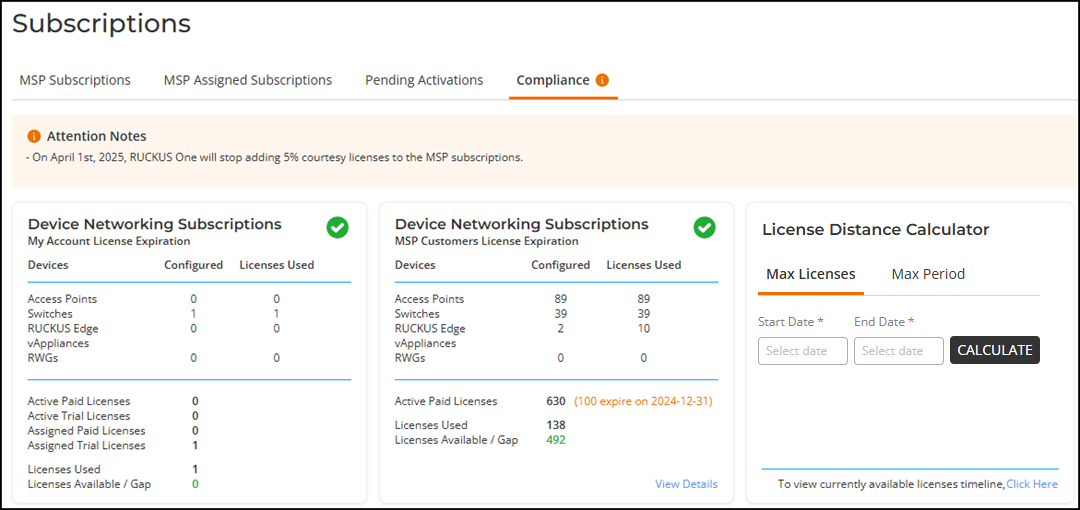
- Device Networking Subscriptions - My Account License Expiration: This panel provides a comprehensive overview of the number of configured devices, such as access points (APs) and switches, along with the number of licenses currently in use. It displays detailed information about all active licenses and those assigned to specific devices. This includes calculating the total number of licenses used and those available for future use. This detailed breakdown helps you effectively manage and plan future licensing by providing clear visibility into current license usage and availability. Refer to Managing License Compliance and Usage for additional information about this panel.
- Device Networking
Subscriptions - MSP Customers License Expiration: This panel
provides a comprehensive overview of the licenses configured for devices
such as access points (APs) and switches, along with the number of
licenses currently in use. It displays detailed information about the
active licenses, those currently in use, and the balance available for
future use. Additionally, the panel provides visibility into the next
expiration dates of the licenses.
The View Details option allows you to access customer status, service expiry, number of licenses assigned, available, used, and configured devices (APs, switches, Edge devices, and RWGs) on a per-customer basis. This detailed information helps you manage licenses effectively by providing a clear picture of usage, availability, and upcoming expirations, enabling better planning and allocation. Refer to Managing License Compliance and Usage for additional information about this panel.
- License Distance
Calculator: This Max Licenses tab
calculates the number of licenses available between a specified start
and end date. The Max Period tab calculates the end
date based on a specified start date and license quantity.
The License Distance Calculator panel also includes an option to view a bar chart that projects the license availability for the next two years.
-
In the Max Licenses tab of the License Distance
Calculator panel, select a Start Date and
End Date from the calendar and click
Calculate.
The number of available licenses for Core and Professional tiers is displayed for the selected date range. For example, in the following figure, from August 29, 2025, to August 31, 2026, 292 Core licenses and 82 Professional licenses are available.Note: If no licenses are available for the chosen end date, a message prompts you to select an earlier date.
License Distance Calculator – Max Licenses 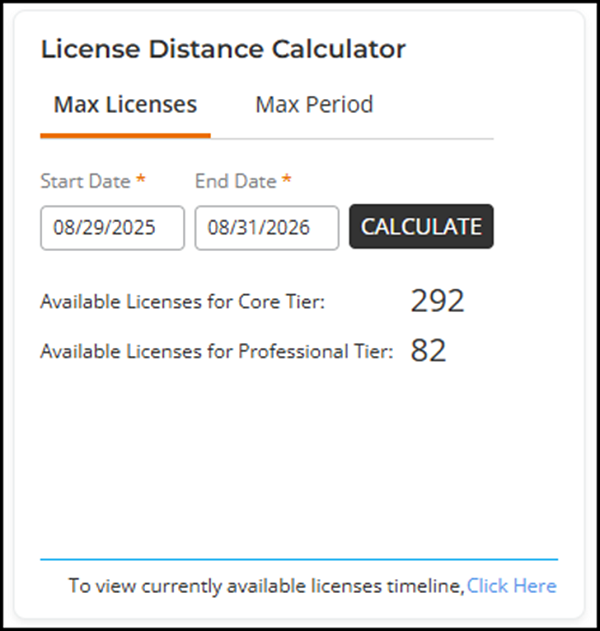 This feature ensures that you can effectively manage and allocate licenses within the given time-frame, avoiding any potential shortages.
 -
In the Max Period tab, you can calculate the maximum
period a specific number of licenses will remain available from a chosen
Start Date. Enter the number of licenses in the
# of Licenses field and click
Calculate.
The end date is displayed for the specified quantity of licenses for Core and Professional tiers. For example, in the following figure, one license starting on August 29, 2025, will be available until August 15, 2028, for the Core tier and until August 15, 2032, for the Professional tier.Note: If you enter a value greater than the available quantity, a message will prompt you to enter a lower quantity in the number of licenses field.
License Distance Calculator – Max Period 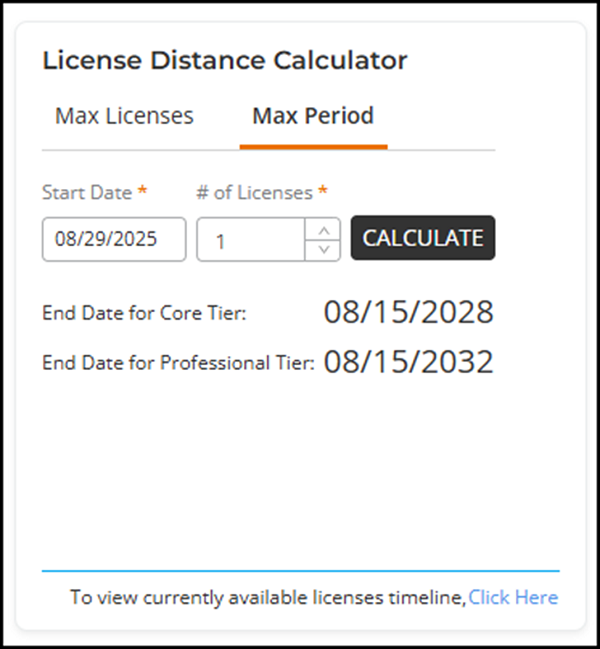
This feature ensures you can plan and manage license usage over time. By giving a clear end date for a number of licenses, it prevents over-allocation and ensures necessary licenses are available. This helps in planning and resource management.
-
In the License Distance
Calculator panel, you can click Click Here to
view future licenses calculated based on current license assignments and usage.
The graphical representation provides a predictive analysis covering the current
month, the rest of the year, and the next two full calendar years, offering a
clear and detailed forecast of license trends.
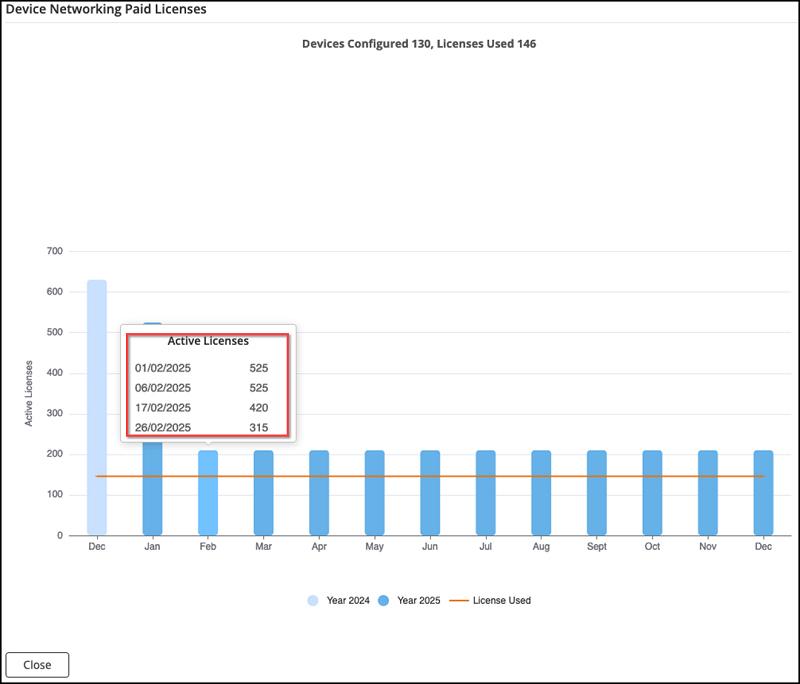
Note: The bar graph displays only active paid licenses.Note: The bar's height represents the number of available active paid licenses on the last day of each month.
For instance, in the following image, the panel shows that 130 devices are currently configured and 146 licenses are in use. You can also track the number of active licenses on a monthly basis by clicking on the bar to display a pop-up box detailing the number of licenses on the first and last day of that month, as well as every other day for which the license quantity changes. In the example image, the maximum number of active licenses was 525 on January 2, 2025; this number gradually decreases throughout the month due to licenses expiring after that date. The orange line on the graph represents the licenses used as of today, providing a real-time snapshot of current license usage. This detailed visualization helps in understanding license dynamics over time, ensuring better planning and management of resources.
Device Networking Paid Licenses - Active Licenses for Two Years