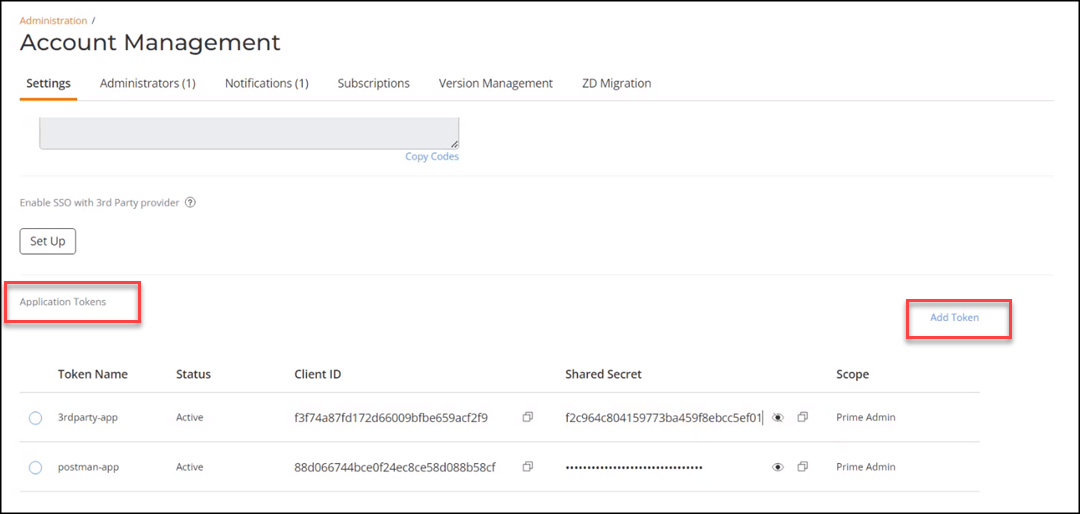
You can generate an application token to
enable secure API communication between a third-party application and RUCKUS One. You can
generate an application key and use the client ID and shared secret to authenticate the
application for API usage.
Complete the following steps to generate an
API token.
Click Manage My Account
to go to the tenant portal for your own account.
You can access Manage My
Account from the top right corner of most MSP portal pages.
The RUCKUS One web interface
is displayed.
On the navigation bar, select
Administration > Account
Management > Settings.
Click Add Application
Token.
The Add API Token
sidebar is displayed.Add
Application Token - Add API Token
Enter the Application Name.
Click
Copy to copy the Client ID.
(Optional) Click
Copy to copy the client secret.
Note: The Client secret
is already generated. You can click Generate Secret to
generate the client secret again and then copy the client secret.
Select
Scope. The options are:
Prime
Admin
Administrator
Guest
User
Read-Only
DPSK
Manager
Click Add.
The API token generation is
complete.
You can use the Client ID and
Shared Secret in a third-party application to interact with
RUCKUS One through API calls.