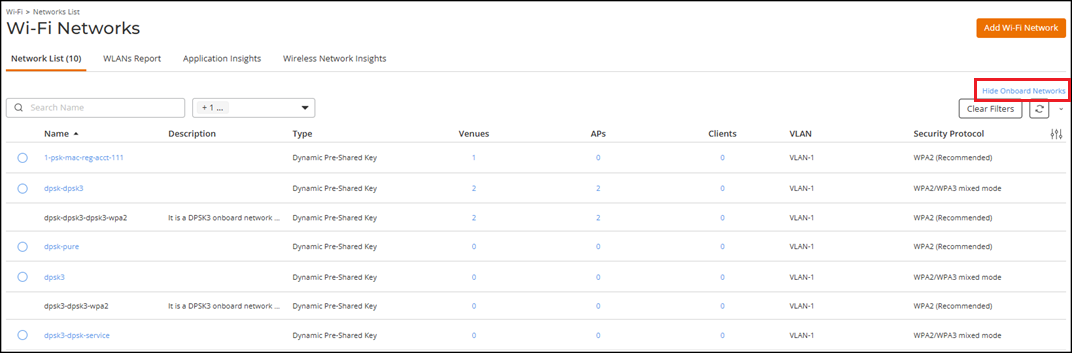
Viewing Onboard Networks in the Network List

The onboard network view displays the Dynamic Pre‑Shared Key (DPSK) onboard network associated with a service network. When enabled, this view separates onboard networks from service networks, allowing you to analyze network‑specific metrics and client behavior.

Onboard networks are available only for Dynamic Pre‑Shared Key (DPSK) networks. For DPSK3 networks, an onboard network is automatically created and cannot be modified directly. Configure all settings through the associated service network.
Note:
  • When onboard networks are hidden, the Clients column shows a combined value for service and onboard networks.
  • When onboard networks are displayed, the Clients column shows separate values for each network.
Complete the following steps to view onboard networks in the Networks List:
  1. On the navigation bar, select Wi-Fi > Wi-Fi Networks > Wi-Fi Networks List.
    The Wi-Fi Networks page is displayed.
  2. Select Dynamic Pre‑Shared Key from the Type drop-down list.
    The Show Onboard Networks option is displayed.
    Wi-Fi Networks List - Show Onboard Networks
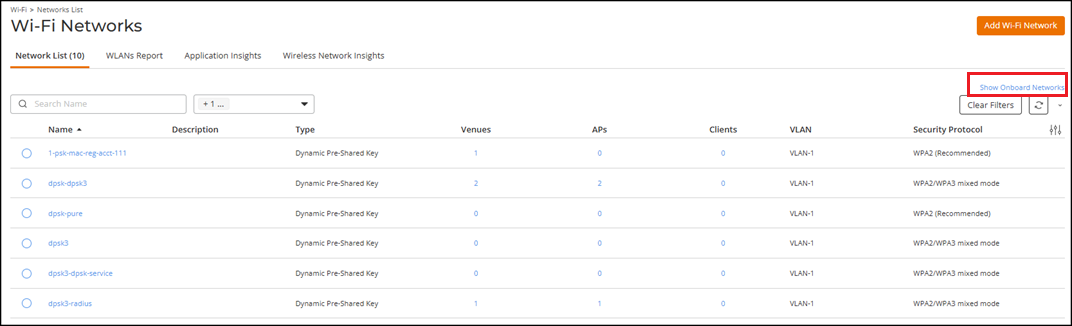
  3. Click Show Onboard Networks to display onboard networks.
    Each onboard network appears as a separate row below the associated service network.
  4. Review the onboard network entries:
    • Name: Displays the network name assigned by the system. The value is not clickable for onboard networks.
    • Description: Provides onboard‑specific context, indicating that the onboard network is not configurable and must be managed through the associated service network.
    • Type: Displays the network type.
    • Venues, APs, and Clients: Displays the number of associated venues, access points, and clients for the onboard network.
      • (Optional) Venues, APs, and Clients: Click a value to open the corresponding tab on the details page of the selected Wi‑Fi network. The client data is automatically filtered for the selected onboard network, and the Clients tab includes counts from both service networks and onboard networks.
  5. (Optional) Click Hide Onboard Networks to suppress displaying the onboard networks in the table.
    Wi-Fi Networks List - Hide Onboard Networks