Support for Batch Operations
RUCKUS One supports performing batch operations (also known as bulk actions) on certain elements and services across your tenant account, such as venues, devices, and services.
This functionality streamlines workflows by reducing repetitive steps and consolidating multiple API calls into a single bulk request, such as deleting devices, rebooting APs, or disconnecting clients. Using this option helps administrators manage large datasets more efficiently.
GUI pages that support batch operations
include a checkbox in the table header, and may also include a  icon
alongside the checkbox. Clicking the checkbox automatically selects all entries in the
table, on that page, and displays a list of available actions that you may perform on
the selected entries. Likewise, clicking the icon and
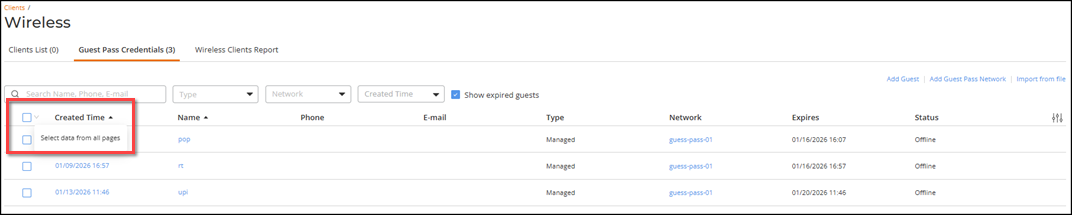
selecting the Select data from all pages option (exemplified in Figure 1) results
in all entries being selected across all pages, and the same displayed list of available
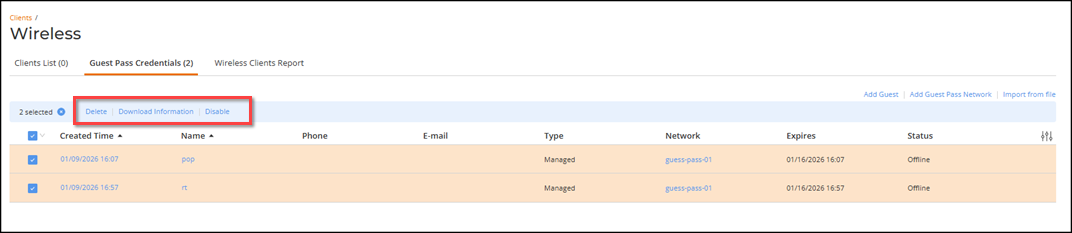
actions (exemplified in Figure 2).
icon
alongside the checkbox. Clicking the checkbox automatically selects all entries in the
table, on that page, and displays a list of available actions that you may perform on
the selected entries. Likewise, clicking the icon and
selecting the Select data from all pages option (exemplified in Figure 1) results
in all entries being selected across all pages, and the same displayed list of available
actions (exemplified in Figure 2).
After you select the operation, the system performs the operation on all selected table entries and provides status messages, as usual, in real-time pop-ups and also in the Activities page. Refer to Viewing Activities for information on how to access and view activity details.