Collecting PMS Credentials from OHIP

You can use Oracle Hospitality Integration Platform (OHIP) to retrieve the external Property Management System (PMS) connection parameters required for PMS integration.

Note: OHIP controls credential availability and environment-level visibility. You must have an active OHIP account with access to the appropriate PMS environment before collecting integration parameters.
Complete the following steps to collect PMS credentials from OHIP for use in PMS configuration in RUCKUS One:
  1. Log in to the OHIP Developer Portal.
    The portal is displayed with access to PMS environments and associated credentials.
  2. Select Environments from the top navigation menu.
    The Environments page is displayed with all available OPERA PMS integration environments.
  3. Select the required environment and click View Details.
    The Sandbox Credentials sidebar is displayed with the environment‑level PMS credentials.
    Environments - View Details
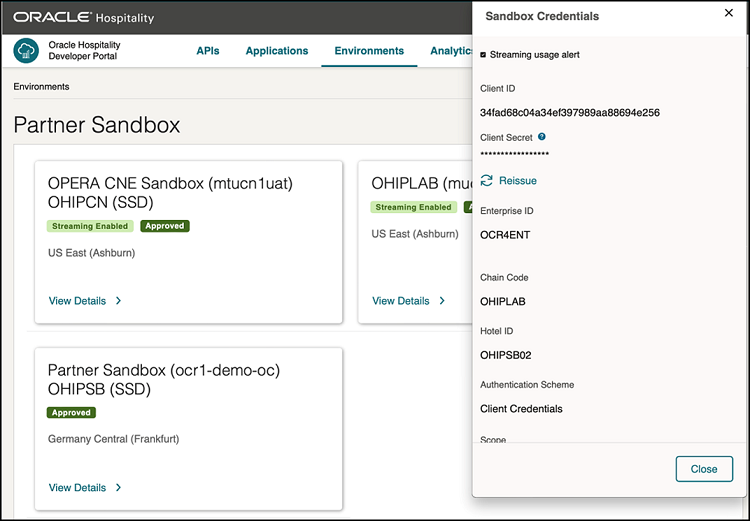
  4. Collect the following PMS credential values:
    • Client ID
    • Client Secret
    • Enterprise ID
    • Gateway URL
    • Hotel ID
    • Chain Code
    • Authentication Scheme
    • Authentication Scope
    • WebSocket URL
      Note: The WebSocket URL uses the same hostname as the Gateway URL, but replaces the HTTP protocol with the WebSocket protocol (ws:// for non‑secure connections or wss:// for secure connections).

    These parameters define how RUCKUS One authenticates with OPERA PMS and retrieves real‑time events.

  5. Select Applications from the top navigation menu.
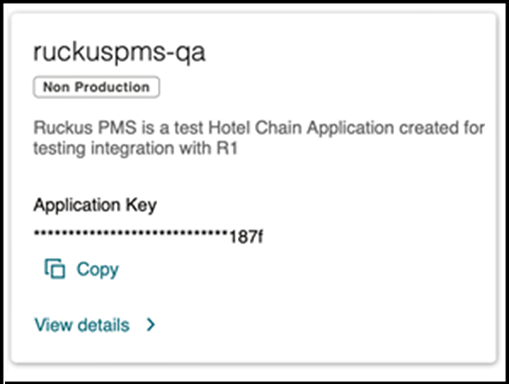
    The Applications page is displayed with access to application‑level credentials required for API authorization.
  6. Locate the required application tile and copy the Application Key.
    This key is used in RUCKUS One for PMS API access.
    Applications - Application Key
  7. Store all collected credentials securely.
    These values must be entered into RUCKUS One when adding a PMS service.
The PMS credentials required for OPERA OHIP integration have been collected and are ready for entry on the Add Property Management System page in RUCKUS One.