Configuring a ServiceNow Scripted REST API
Endpoint for Webhook Integration
The Webhooks service forwards
real‑time incident, activity, and event notifications from RUCKUS One to external systems. A ServiceNow Scripted REST API endpoint receives the
webhook payload and can create or update incidents based on the received data.
Note:
Each RUCKUS One tenant can create up to 20 webhook configurations. The
Name and Webhook URL must be unique per tenant. At least one category
(Incidents, Activities, or Events) must be selected before you can enable a
webhook.
For ServiceNow, the shared secret is included inside the payload for
compatibility with existing customer scripts. Other payload types may send
the secret in the Authorization header. Ensure your ServiceNow script checks
the correct location for the secret.
Complete the following steps to set
up a ServiceNow Scripted REST API to receive and process notifications:
Log in to the ServiceNow instance.
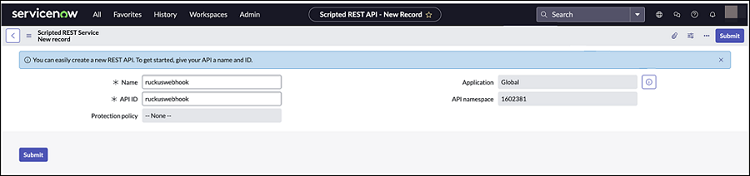
Select System Web Services > Scripted REST APIs and click New.
Scripted Rest APIs -
NewA new record to configure the Scripted REST API (service) is displayed.
Configure the following:
Name:
Enter the service name.
Application: Enter the scope of the application. For
example, set the scope to Global.
API ID:
Enter the API ID.
API
Namespace: This value is system‑generated.
Protection
Policy: Select the appropriate policy.
Scripted Rest Service - New Record
Click Submit.
The Scripted REST Service
is created.
Open the Scripted
REST Service, click New in the
Resources tab.
Set HTTP
method to POST, set
Relative path to
/notification, and paste the following script.
Note: Ensure that the spacing is
retained when you copy and paste the code.
(function process(/*RESTAPIRequest*/ request, /*RESTAPIResponse*/ response) {
  // Secret shared between Ruckus One and ServiceNow
  // to ensure the authenticity of data received.
  var secret = "12345678";

  var data = request.body.data;
  // Ensure request uses correct shared secret key
  if (data.secret == secret) {
    var mode; // insert or update
    var inc = new GlideRecord('incident');

    // Check if incident exists
    inc.addQuery('number', data.payload.id);
    inc.query();

    if (inc.hasNext()) {
      inc.next();
      mode = "update";
    } else {
      inc.initialize();
      mode = "insert";
    }

    // Add/update fields
    inc.number = data.payload.id;
    inc.state = 1; /* New */
    inc.impact = 2; /* Medium */
    inc.urgency = 2; /* Medium */
    inc.short_description = data.name + " " + data.type;
    inc.description = getDescription(data);

    // Insert/Update the incident
    inc[mode]();

    var status = mode + (mode == 'insert' ? 'ed' : 'd');
    gs.info('incident ' + data.payload.id);
  } else {
    gs.warn("Invalid secret to run Ruckus One webhook");
  }

  // Respond to the Webhook
  response.setStatus(200);

  /**
   * Generate description for incident
   */
  function getDescription (data) {
    return [
      'id : ' + data.id,
      'name : ' + data.name,
      'type : ' + data.type,
      'tenantId : ' + data.tenantId,
      '',
      'Details:',
      '------------------------------------------------',
      'id: ' + data.payload.id
    ].join('\n');
  }
})(request, response);
Set these script variables
after pasting:
<var
                                secret>
: Set the secret value (enclosed in double
quotes) for data authentication (must match the value you configure in
RUCKUS One).
(Optional) <assignment_group>: Assign the RUCKUS One incident
to a specific group.
(Optional) <assigned_to>: Set a specific assignee.
Note: The <assignment_group> and <assigned_to> fields are optional ServiceNow‑only
settings that you configure directly in your ServiceNow Scripted REST API.
These fields are not part of the RUCKUS One webhook
payload.
(Optional) In the
Security tab, uncheck Requires
Authentication if you rely only on the shared secret.
The Webhook URL will
comprise <ServiceNow instance host> / <BASE API Path> / <Relative
Path>. For example:
https://dev187130.service-now.com/api/1602381/ruckuswebhook/notification.
Click Submit.
You can now create a Webhook service that integrates with
ServiceNow. Refer to Adding a Webhook for more details.
 Configure the following: