Viewing and Syncing Config Template Drifts
RUCKUS One detects configuration drift between an MSP configuration template and the configurations applied to End Customers (ECs). A drift occurs when an EC’s configuration differs from the configuration defined in the MSP template. You can review these differences and synchronize the EC configuration to match the MSP template.
 icon
displays the message indicating that the Drifts are not available.
icon
displays the message indicating that the Drifts are not available.-
Click Show Drifts.
The Customer Drifts Report sidebar opens and displays the configuration drift operation names along with the configuration paths and values showing the differences.
Configuration Templates - Customer Drifts Report 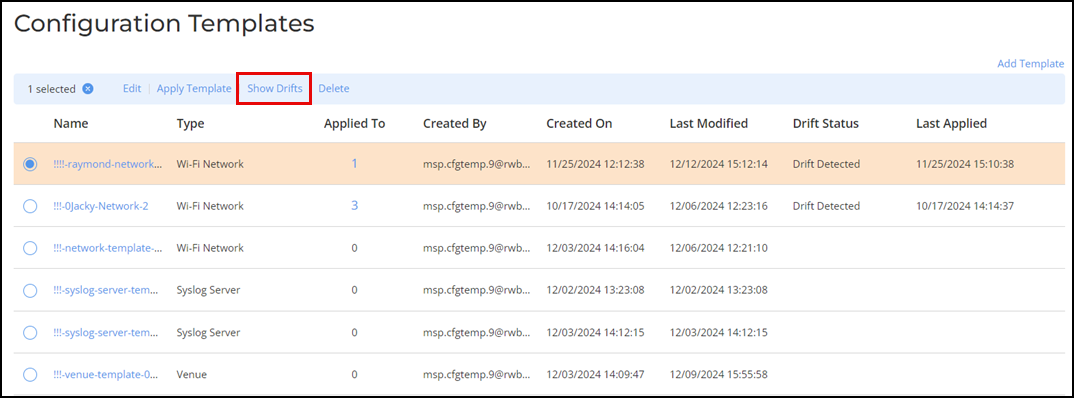
-
Synchronize configuration drifts to ensure consistency between the MSP
configuration template and EC configurations.
To synchronize drifts for a single EC:
- Select the checkbox for the desired EC in the Customer Drifts Report sidebar or select the ECs from the All Customers drop-down list.
- Click Sync.
The EC configuration is updated to match the MSP template, and the Drift Status changes to In Sync.
Customer Drifts Report Sidebar 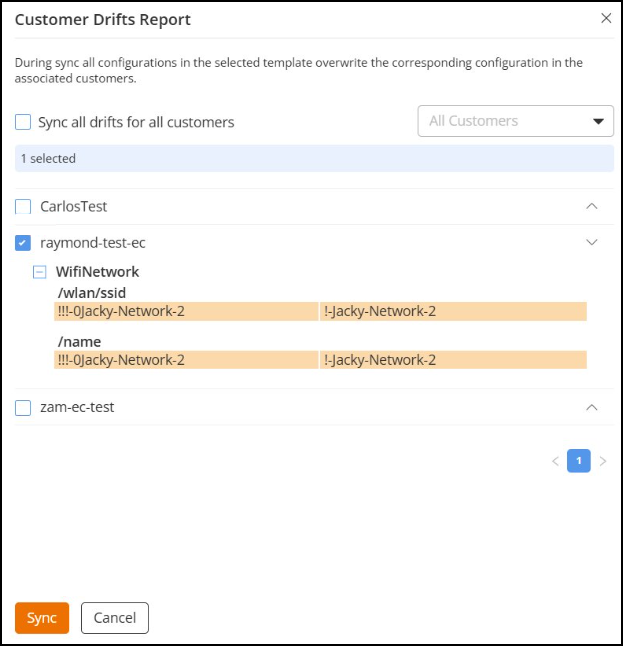
To synchronize all drifts for multiple ECs:
- Select the checkbox
alongside the Select data from all pages.
When Select data from all pages is enabled, all ECs across all paginated results are included automatically.
- Click Sync.
Note:- The Sync operation synchronizes only the template-related configurations to the MSP-EC tenant.
- The Sync operation attempts to apply the dependent templates if the MSP-EC tenant does not already have them.
- Synchronizing drifts overwrites existing configurations in the associated venues or devices. Review the configuration differences carefully in the Drifts Report before applying changes. If the venue template includes AP Management VLAN settings, the VLAN configuration will also be updated when you sync the drift.